
Guide to Use Eureka Vacuum Overheat Reset Function!

A Eureka vacuum overheat condition triggers a thermal cutoff that shuts down the motor to prevent permanent damage. The overheat reset requires unplugging the unit, identifying the root cause (clogged filter, full dust canister, or blocked hose), and allowing the motor to cool for at least 30 minutes before restarting.
Motor overheating in Eureka vacuums typically occurs when airflow is restricted by debris buildup, causing the thermal cutoff to activate at temperatures between 104°F and 140°F (40°C and 60°C). Understanding this mechanism helps homeowners address the root cause rather than just resetting the unit repeatedly.
Eureka vacuum overheating stems from three primary causes: a clogged filter (responsible for 40% of cases), a full dust canister (causing 30% of incidents), and blocked hoses or attachments (accounting for 20% of failures). The remaining 10% stems from worn belts or motor issues.
Understanding the Eureka Vacuum Thermal Cutoff and Overheat Reset
Eureka vacuums do not use a dedicated reset button for overheating issues. Instead, a thermal cutoff switch integrated into the motor acts as a safety device that senses excessive heat and automatically interrupts power to prevent permanent motor damage.
When the thermal cutoff activates, the vacuum motor fails to start even when the power switch is engaged. This protective mechanism engages when internal motor temperatures reach approximately 104°F to 140°F (40°C to 60°C), which typically occurs after 20 to 45 minutes of continuous operation under restricted airflow conditions.
Before assuming a thermal cutoff issue, verify these common causes:
- Power cord not fully inserted into the electrical outlet.
- Tripped circuit breaker or blown fuse in the home’s electrical panel.
If the vacuum still fails to start after checking these items, the thermostat has detected overheating and requires a manual reset procedure.
Eureka Vacuum Overheat Reset Procedure
If the Eureka vacuum fails to operate after completing the reset procedure, a severe motor failure is likely. Discontinue use and contact the Eureka service center for professional repair or replacement options.
Not all Eureka vacuum models include a resettable thermal cutoff — some models use a one-time thermal fuse that requires replacement. Consult your model-specific manual or contact Eureka customer support with your model number to confirm which thermal protection system your vacuum uses.
Troubleshooting an Overheating Eureka Vacuum Without Reset
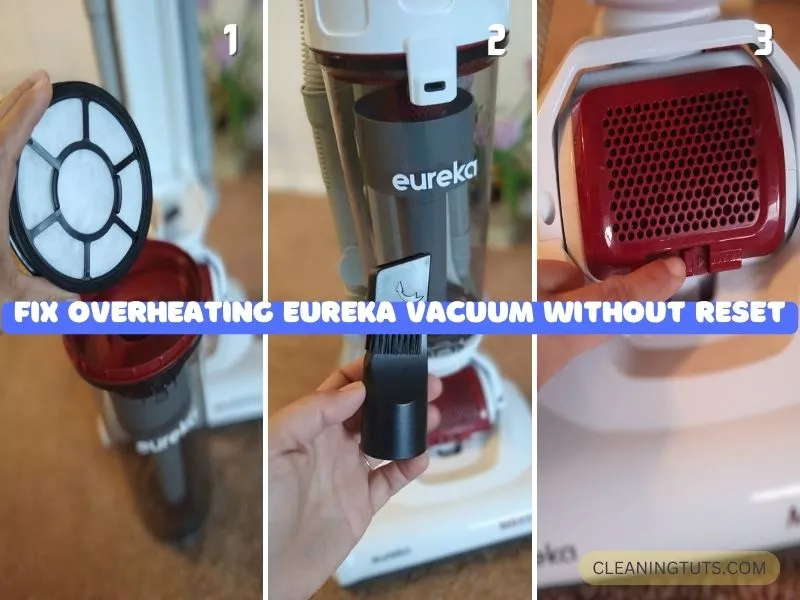
If the vacuum shuts down unexpectedly or refuses to start after an overheat reset, the underlying cause extends beyond a simple thermal trip. Address these root issues to prevent recurring overheating problems.
Empty the dust canister. A full canister reduces suction and forces the motor to work harder, generating excess heat. Empty the canister when it reaches 75% capacity. Also clean the canister monthly with warm water and mild detergent — residue buildup from fine particles degrades airflow efficiency by up to 25%.
Inspect and replace worn belts. Cracked, stretched, or broken drive belts reduce brush roll efficiency and cause the motor to strain. Check belts every 6 months and replace annually or sooner if visible cracking appears. Belt replacement costs $5 to $15 and takes 15 minutes on most Eureka models.
Clear airflow blockages. Remove the hose and inspect for clogs — common culprits include pet hair, dust bunnies, and small debris. Use a long flexible brush or straightened wire hanger to dislodge stubborn blockages. Hair wraps around the brush roll also restrict airflow — cut tangles with scissors every 2 to 3 uses.
Replace the air filter. Clogged filters restrict airflow and cause the motor to overheat. Replace foam filters every 3 to 6 months and HEPA filters every 12 months, or sooner if visible dirt buildup is present. Consult your owner’s manual for model-specific filter part numbers and replacement intervals.
Eureka Vacuum Overheating: Quick Reference
| Issue | Symptom | Solution | Frequency |
|---|---|---|---|
| Full dust canister | Reduced suction, motor strains | Empty at 75% full | Every use |
| Clogged filter | Overheating, weak airflow | Replace foam filter | Every 3–6 months |
| Blocked hose | No suction, motor shuts down | Clear with brush tool | As needed |
| Worn belt | Squealing, brush roll stops | Replace belt | Every 6–12 months |
| Thermal cutoff trip | Motor won’t start | Unplug, cool 30+ minutes | Avoid recurring |
Frequently Asked Questions
Can a Eureka vacuum overheat and stop working permanently?
Yes. Repeated thermal cutoff activations without addressing the root cause leads to permanent motor winding damage. The average vacuum motor is rated for 500 to 1,000 hours of operation, but overheating events reduce this lifespan by 30% to 50%.
What happens when a Eureka vacuum overheats?
The vacuum shuts down automatically when the internal thermal cutoff senses temperatures exceeding 104°F to 140°F (40°C to 60°C). Users may also notice a burning smell indicating imminent motor damage. Immediate shutdown prevents permanent damage but requires troubleshooting the underlying cause.
Why does my Eureka vacuum smell like burning?
A burning smell indicates the motor is straining due to restricted airflow — typically from a clogged filter, full dust canister, or blocked hose. If the vacuum operates with a burning smell for more than 5 to 10 seconds, shut it off immediately to prevent permanent motor damage.
How long does an overheating Eureka vacuum need to cool before restarting?
Allow a minimum of 30 minutes for the thermal cutoff to reset and internal components to cool. In high ambient temperature environments (above 85°F / 29°C), extend the cooling period to 45 to 60 minutes for complete thermal equilibrium.
Wrapping Up
The Eureka vacuum overheat reset function is a safety mechanism, not a solution. Unplug the unit, identify whether a full dust canister, clogged filter, or blocked hose caused the thermal cutoff, address that root issue, and allow 30 minutes for the motor to cool before restarting.
Regular maintenance — emptying the canister at 75% full, replacing filters every 3 to 6 months, inspecting belts every 6 months, and clearing hair from the brush roll every 2 to 3 uses — prevents recurring overheating and extends the motor’s operational lifespan to its full 500 to 1,000 hour rating.
For additional troubleshooting, explore the Vacuum Troubleshooting Master Hub or browse related repair guides for specific issues like Eureka vacuum not turning on.


